
AI in Software Engineering: How AI Is Changing Engineering
AI in Software Engineering: How AI Is Changing Engineering
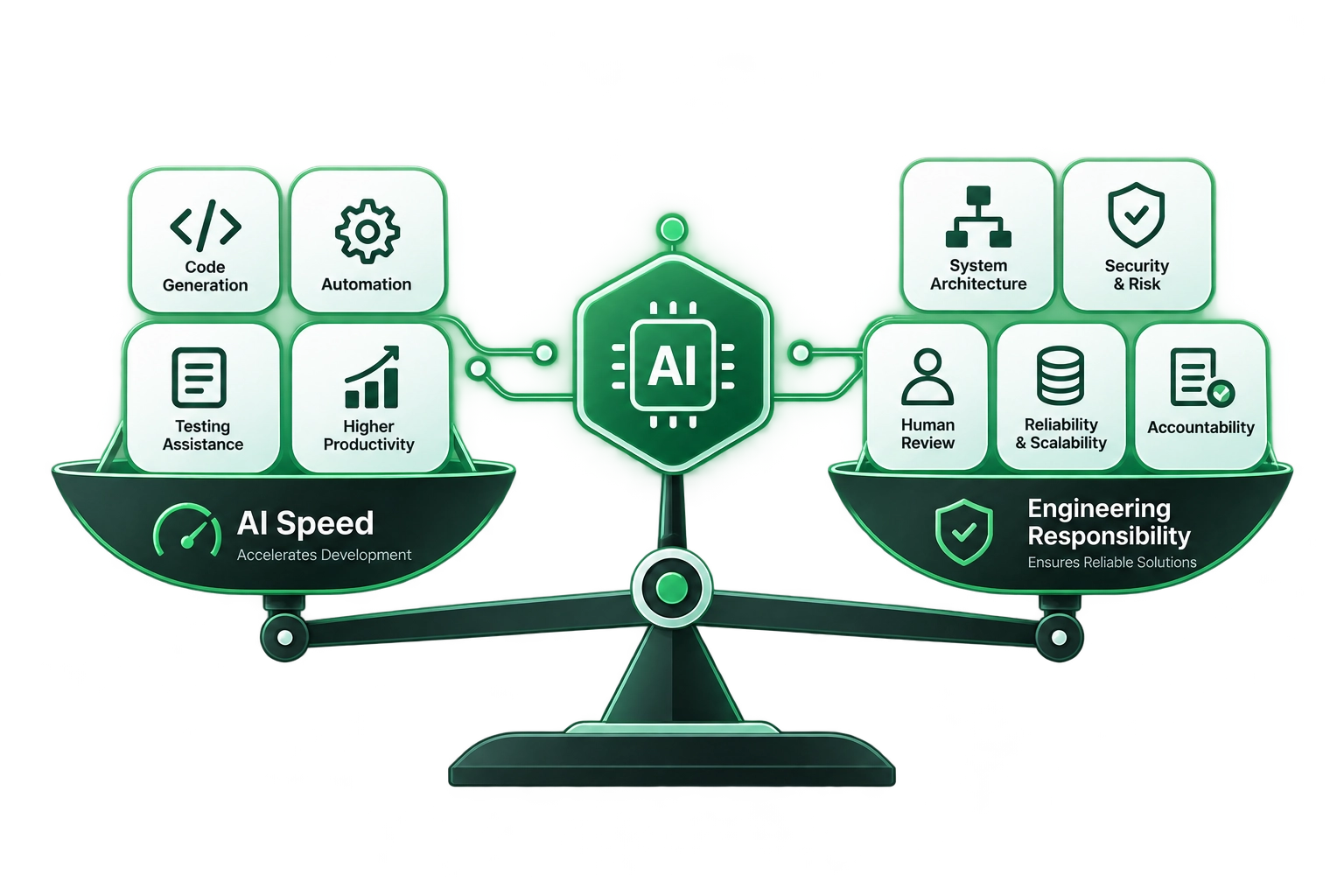
AI is changing software engineering by accelerating development, testing, documentation, and repetitive implementation while increasing the importance of architecture, security, critical evaluation, and human judgment.
Software Development
September 17, 2026

Md. Kabin Hasan Kanchon
AI/ML-focused software engineer specialized in building production-grade intelligent systems, with a keen focus on scalable architecture, reliable deployment, and solving real-world engineering problems. My expertise spans machine learning, computer vision, generative and agentic AI, complemented by practical experience in MLOps, distributed systems, backend services, and infrastructure to deliver robust AI solutions from prototype to production.
AI has moved from being an experimental developer tool to becoming part of everyday software development. Large language models, coding assistants, and AI agents can now generate code, write tests, explain documentation, refactor functions, and help review pull requests.
That does not mean software engineering is disappearing.
It means AI in software engineering is changing how engineers spend their time, how teams build products, and which skills matter most.
The important question is no longer whether AI can write code. It clearly can. The more useful question is how engineers can combine AI’s speed with human judgment, architecture, security, product understanding, and accountability.
This shift is already visible in developer workflows. Stack Overflow’s 2025 Developer Survey reported that more than 84% of developers were using or planning to use AI tools, while only 29% said they trusted AI output. By March 2026, 58% of developers reported using AI at work every day. (Stack Overflow Blog)
That combination tells an important story: AI adoption is growing, but developers still see a need for human oversight.
Table of Contents
- What Is AI Changing in Software Engineering?
- Engineering Has Never Been Just About Writing Code
- What the Productivity Data Actually Shows
- Where AI Helps Software Engineers Most
- Where Human Engineering Judgment Still Matters
- A Practical AI-Assisted Software Engineering Workflow
- How AI Changes the Skills Engineers Need
- AI, Security, and Code Quality
- The Future of Software Engineering
- Key Takeaways
- Conclusion
What Is AI Changing in Software Engineering?
AI is changing software engineering primarily by reducing the amount of repetitive work engineers need to perform manually.
Tasks that once required searching through documentation, writing boilerplate, creating basic tests, explaining APIs, or fixing straightforward syntax errors can increasingly be accelerated with AI-assisted tools.
That does not eliminate the engineering process. Instead, it moves more of the engineer’s attention toward designing, evaluating, validating, and improving software systems.
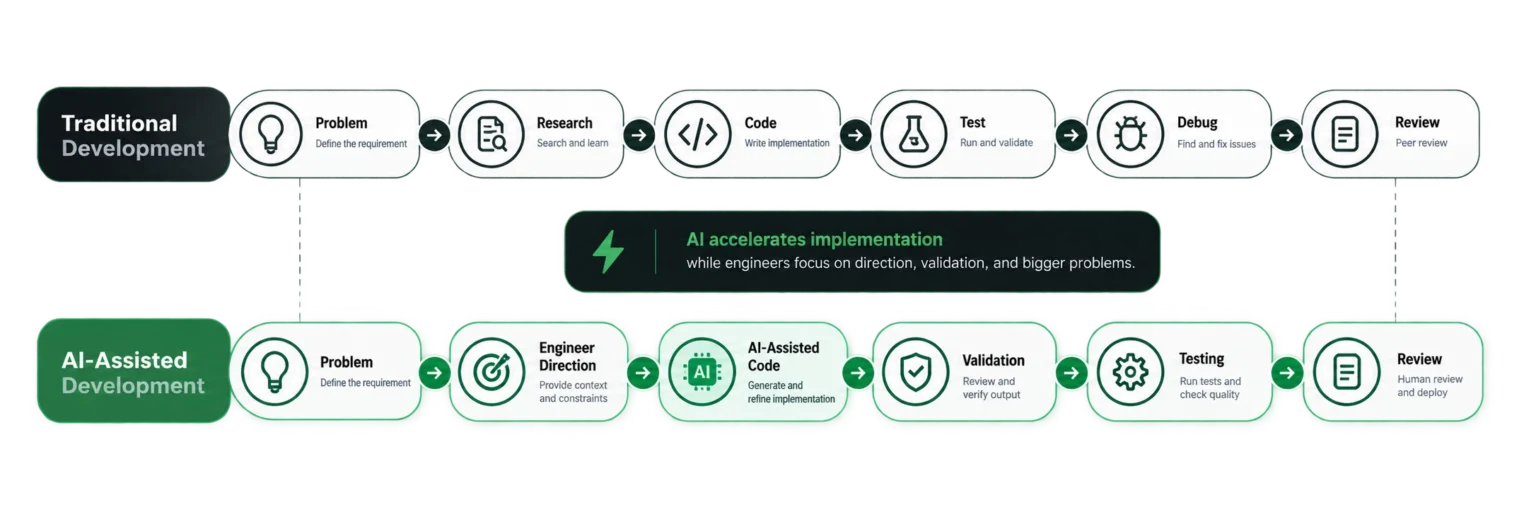
A useful way to think about the transition is:
Before AI
Problem → Research → Implementation → Testing → Debugging → Review
With AI assistance
Problem → Direction → AI-assisted implementation → Validation → Testing → Review → Improvement
The implementation step can become faster, but the surrounding engineering responsibilities remain.
Engineering Has Never Been Just About Writing Code
It is easy to define software engineering as writing code.
In practice, writing code is only one part of the job.
Software engineers also need to:
- Understand business requirements
- Design systems that can scale
- Choose appropriate architectures
- Make trade-offs between performance, cost, and complexity
- Debug difficult production problems
- Protect applications and data
- Understand unfamiliar codebases
- Communicate with product and design teams
- Evaluate technical risks
- Make decisions when requirements are incomplete
The original article makes this distinction clearly: code is the artifact through which engineering decisions are expressed, rather than the complete definition of engineering itself.
AI is already very capable at generating functions, boilerplate, tests, and other implementation artifacts.
The harder problem is deciding what should be built, why it should be built, how it should fit into the larger system, and whether the generated solution is actually correct.
That distinction becomes increasingly important as AI tools become more capable.
What the Productivity Data Actually Shows
There is no single productivity number that describes the effect of AI on every software engineer.
The results depend heavily on the task, codebase, developer experience, tooling, and workflow.
For example, an earlier GitHub study involving 95 professional developers found that developers using GitHub Copilot completed a specific JavaScript task 55% faster than the control group. (The GitHub Blog)
But other research has produced very different results.
A 2025 randomized controlled trial from METR studied 16 experienced open-source developers working on mature repositories. In that specific environment, developers using early-2025 AI tools took 19% longer to complete tasks than developers working without AI. METR emphasized that the study should not be generalized to all software development.
METR’s February 2026 update provided another important piece of the picture. Its later experiment suggested that developers may now be more accelerated by newer AI tools, but selection effects made the size of that improvement too uncertain to establish confidently.
So what should engineers take from this?
Not that AI is useless.
And not that AI automatically makes every developer dramatically faster.
The more useful conclusion is:
AI productivity depends on where and how you use it.
AI can be highly effective for some tasks while creating additional verification work for others.
That makes engineering judgment more important, not less.
Where AI Helps Software Engineers Most
The strongest use cases tend to involve tasks where the engineer can clearly define the desired result and quickly verify the output.
1. Boilerplate and Repetitive Code
AI can generate repetitive structures such as:
- CRUD operations
- Basic API handlers
- Data models
- Configuration files
- Common utility functions
- Test scaffolding
- Documentation templates
Instead of manually typing predictable structures, engineers can spend more time reviewing the generated implementation and adapting it to the application.
2. Unit Tests and Test Scenarios
AI can help developers generate initial test cases from existing functions.
For example, an engineer can ask an AI coding assistant to identify:
- Normal input
- Empty input
- Invalid input
- Boundary conditions
- Expected exceptions
- Failure scenarios
The engineer still needs to verify whether the tests actually represent the application’s requirements.
3. Documentation and Code Explanation
AI can explain unfamiliar functions, summarize modules, and turn implementation details into documentation.
This can be particularly useful when joining an existing project or working with a large codebase.
4. Debugging Assistance
AI can help identify likely causes of an error, interpret stack traces, suggest debugging strategies, or compare alternative implementations.
The important word is assistance.
An AI-generated explanation is a hypothesis to investigate, not automatically the root cause.
5. Learning and Research
Developers increasingly use AI alongside documentation and other technical resources when learning.
Stack Overflow’s March 2026 analysis found that 58% of developers reported using AI at work every day, while experienced developers were still using technical documentation alongside AI tools. (Stack Overflow Blog)
The strongest workflow is therefore not:
AI instead of documentation.
It is:
AI + documentation + experimentation + engineering judgment.
Where Human Engineering Judgment Still Matters
The more complicated the problem becomes, the more important evaluation becomes.
Consider a simple request:
“Create a function that validates an email address.”
An AI system can produce several implementations almost instantly.
Now consider:
“Design the authentication architecture for a multi-tenant enterprise application handling sensitive customer data.”
That problem requires decisions about:
- Authentication protocols
- Authorization
- Identity boundaries
- Session management
- Data isolation
- Secrets management
- Audit logging
- Failure handling
- Compliance requirements
- Infrastructure
- Scalability
- Threat modeling
There is no single prompt that magically determines the correct architecture.
The engineer needs to understand the environment, identify constraints, compare alternatives, and accept responsibility for the resulting system.
That is where AI in software engineering becomes augmentation rather than substitution.
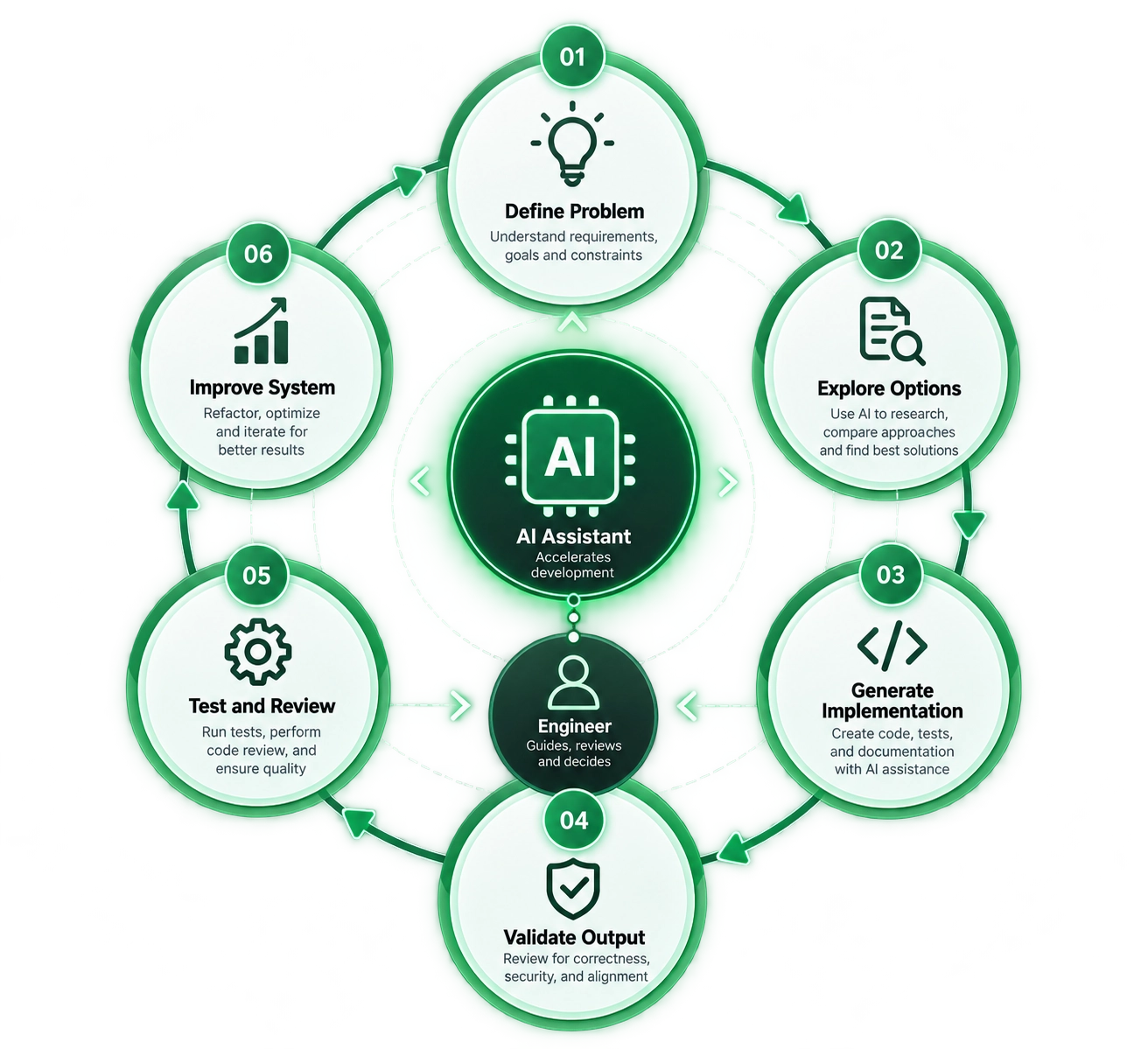
A Practical AI-Assisted Software Engineering Workflow
Instead of asking AI to build an entire feature blindly, engineers can integrate it into a controlled development workflow.
Step 1: Define the Problem
Start with the requirement, not the AI tool.
Clearly establish:
- What needs to be built
- Who will use it
- What constraints exist
- What the expected behavior is
- What should happen when things go wrong
A poorly defined problem will usually produce a poorly defined solution, regardless of how capable the model is.
Step 2: Ask AI to Explore the Problem
Use AI to investigate possible approaches.
For example:
- Compare implementation strategies
- Explain unfamiliar APIs
- Identify edge cases
- Suggest architectural options
- Review existing code
- Generate a development checklist
At this stage, AI acts as a technical brainstorming and analysis assistant.
Step 3: Generate a First Implementation
Once the approach is understood, use AI to accelerate implementation.
This is where coding assistants can provide substantial value:
- Generate repetitive code
- Create test scaffolding
- Refactor existing functions
- Write documentation
- Convert patterns between languages
- Generate API clients
- Create initial configuration
The engineer remains responsible for deciding what gets accepted.
Step 4: Validate the Output
Never treat generated code as automatically correct.
Check:
- Does it satisfy the requirement?
- Does it follow the project’s architecture?
- Does it handle edge cases?
- Does it introduce unnecessary complexity?
- Does it expose security risks?
- Does it use dependencies appropriately?
This is the stage where AI-assisted development differs from simply asking AI to “write the application.”
Step 5: Test and Review
Run:
- Unit tests
- Integration tests
- Static analysis
- Security checks
- Type checking
- Performance tests where appropriate
- Human code review
The objective isn’t simply to produce code faster.
The objective is to produce reliable software faster.
Step 6: Improve the System
After validation, engineers can use AI again to identify improvements.
Ask questions such as:
- Can this implementation be simplified?
- Are there duplicated patterns?
- Are there missing tests?
- Are there obvious performance problems?
- Could this API be easier to maintain?
The engineer then decides which recommendations are actually appropriate.
How AI Changes the Skills Engineers Need
AI does not make technical skills irrelevant.
It changes the balance between different skills.
Engineers increasingly need to combine technical depth with evaluation and system-level thinking.
Systems Thinking
Understanding how components interact becomes increasingly valuable.
An engineer needs to see beyond a single function and understand:
- Services
- APIs
- Databases
- Infrastructure
- Authentication
- Observability
- Security
- User workflows
AI-Assisted Development
Engineers should learn how to use AI tools effectively rather than simply knowing that they exist.
That includes:
- Writing clear technical instructions
- Providing relevant context
- Breaking large problems into smaller tasks
- Reviewing generated code
- Using AI for testing and documentation
- Understanding where AI performs poorly
Critical Evaluation
Perhaps the most important skill is knowing when not to trust the output.
A generated answer can look convincing while still being incorrect.
Developers therefore need the ability to verify assumptions, test behavior, inspect dependencies, and challenge recommendations.
Software Architecture
As implementation becomes easier to generate, architecture can become an even more important differentiator.
Engineers still need to decide:
- How systems communicate
- Where data belongs
- How services scale
- How failures are handled
- How security boundaries work
- How systems evolve over time
Communication and Product Thinking
Software exists to solve problems for people and organizations.
Engineers who understand the customer, business context, and product goals can use AI more effectively because they can provide better direction and evaluate whether the result actually solves the right problem.
AI, Security, and Code Quality
Speed creates another responsibility: verification cannot disappear simply because implementation becomes faster.
Security is a particularly important example.
Veracode’s 2026 GenAI Code Security research reported that only about 55% of the AI-generated coding tasks in its benchmark produced secure code. Its testing covered 80 tasks across Java, JavaScript, C#, and Python, using several common vulnerability categories. (Veracode)
That does not mean that 45% of all production code written with AI is insecure. The result comes from a specific benchmark methodology.
It does show something engineers should take seriously:
Code that works is not necessarily code that is secure.
AI-generated code still needs:
- Human review
- Automated testing
- Static analysis
- Dependency checks
- Security scanning
- Appropriate access controls
- Threat modeling for sensitive systems
This is especially important as teams increase the amount of code they can generate.
If implementation becomes faster but review does not scale with it, technical and security debt can accumulate faster.
Use Familiar Patterns to Reduce Cognitive Load
Users bring expectations with them.
A search icon suggests search. A navigation menu suggests navigation. A back arrow usually takes users toward the previous location. A familiar form layout tells users where information belongs.
These conventions reduce the amount of explanation an interface needs.
Think about a supermarket. You do not need to learn an entirely new navigation system every time you visit a different branch. Signs, aisles, product groupings, and checkout areas follow familiar patterns.
Digital interfaces benefit from the same principle.
A user should not have to relearn how navigation, forms, buttons, or feedback work every time they move to another screen.
Material Design provides established patterns that help teams maintain these expectations across an application.
That does not mean every Material-based product needs to look identical. The design system provides the foundation while teams can adapt the visual language to their brand and product requirements.
The Role of Human Review Is Changing, Not Disappearing
The growth of AI-assisted development creates an interesting paradox.
Developers can generate more code than before, but generating more code does not automatically mean producing better software.
Stack Overflow’s 2025 research illustrates this trust gap clearly. While more than 84% of respondents reported using or planning to use AI tools, only 29% said they trusted AI output. (Stack Overflow Blog)
That skepticism has a practical purpose.
Experienced engineers understand that production software has consequences.
A small mistake in generated code can become:
- A security vulnerability
- A data integrity problem
- A performance bottleneck
- A difficult production incident
- Technical debt
- An architectural constraint that becomes expensive to remove later
AI can help create the solution.
The engineer still needs to determine whether that solution belongs in production.
AI Is Raising the Engineering Bar
As AI handles more implementation work, engineers can increasingly spend time on problems that require deeper reasoning.
Building production-grade AI applications, for example, involves much more than writing a prompt.
Teams need expertise in:
- System architecture
- Model evaluation
- Retrieval-augmented generation
- Agent design
- Tool integration
- Security
- Governance
- Monitoring
- Human oversight
- Reliability
The original article makes this point well: AI systems introduce new engineering responsibilities around evaluation, architecture, integration, security, governance, and monitoring.
This means the definition of a strong software engineer is expanding.
The valuable engineer is not simply the person who can type code fastest.
It is the person who can understand the problem, direct AI effectively, evaluate its output, and turn that output into reliable software.
What Organizations Should Ask Instead
There is an easy question to ask:
How many engineers can AI replace?
There is another question that may be more useful:
What can our engineering team build now that it could not build before?
AI can potentially reduce the time spent on repetitive implementation and free teams to invest more time in:
- New product features
- Performance improvements
- Better testing
- Security hardening
- Technical modernization
- Customer problems
- New experiments
- Product innovation
The original article describes this as a shift from thinking about reducing engineering headcount toward thinking about increasing what engineering teams can accomplish.
The outcome will ultimately depend on how organizations choose to use the additional capacity AI creates.
The Future of Software Engineering
Software engineering has always evolved alongside its tools.
Compilers changed programming.
Cloud computing changed infrastructure.
Containers changed deployment.
Automation changed testing and operations.
AI is now changing software development at an even faster pace.
Some repetitive tasks will continue to disappear. New development workflows will emerge. Engineers will work with increasingly capable AI systems and increasingly autonomous development tools.
But the core engineering challenge remains:
Build systems that solve real problems and continue to work when the real world gets complicated.
AI can generate code.
It can suggest architectures.
It can analyze logs.
It can write tests.
It can explain documentation.
It can even perform increasingly complex development tasks.
But software still needs people who can define the problem, understand the consequences, make trade-offs, validate the result, and take responsibility for what reaches production.
The engineers who adapt to AI-assisted development will not simply become faster at writing code.
They will become better at deciding what code should exist in the first place.
Key Takeaways
- AI in software engineering is changing workflows rather than reducing engineering to code generation.
- AI is particularly useful for repetitive implementation, testing, documentation, debugging assistance, and exploration.
- Productivity results vary significantly depending on the task, developer, codebase, and AI workflow.
- Human judgment remains essential for architecture, security, requirements, trade-offs, and production reliability.
- AI-generated code should be reviewed, tested, and security-checked before reaching production.
- Engineers increasingly need systems thinking, AI-assisted development skills, critical evaluation, architecture, communication, and product understanding.
- The most useful question is not only how much work AI can automate, but what engineering teams can build with the additional capacity.
Conclusion
AI is changing software engineering, but the change is more interesting than a simple story about humans versus machines.
The engineer’s role is evolving from writing every piece of implementation manually toward directing systems, evaluating AI output, solving complex problems, and making higher-level technical decisions.
The strongest engineering workflow is therefore not AI replacing engineers.
It is engineers working with AI while keeping human judgment at the center of the development process.
For software teams, the opportunity is not simply to generate more code. It is to use AI to spend more engineering time on architecture, reliability, security, product innovation, and the problems that require genuine technical judgment.
Looking to build or scale a modern software product? Polygon Technology helps businesses design, develop, and scale reliable software products with experienced engineering teams and modern development practices.
We use cookies to ensure that we give you the best experience on our website. If you continue to use this site we will assume that you are happy with it.AcceptPrivacy policy