

How to Choose the Right Server Based on Your Application
How to Choose the Right Server Based on Your Application
Learn how to choose the right server for your application. Covering CPU/RAM calculations, microservices scaling, & real-world case study.
Technology
January 27, 2026

Al muntasir

Choosing the right server for your application is one of the most critical decisions in the software development lifecycle. The server infrastructure forms the backbone of your application, directly impacting performance, scalability, user experience, and operational costs. Making an informed decision requires understanding not just your current needs, but also anticipating future growth and evolving requirements.
Understanding Server Selection: The Foundation
Server selection is not merely about picking the cheapest or most powerful option available. It’s a nuanced process that requires careful analysis of your application architecture, expected traffic patterns, data requirements, and budget constraints. A well-chosen server ensures optimal performance during normal operations while maintaining resilience during traffic spikes. Conversely, poor server selection can lead to frequent downtime, sluggish response times, and frustrated users – ultimately damaging your application’s reputation and business goals.
The complexity of modern applications, especially those built on microservices architectures, means that server requirements must account for multiple interconnected components. Each service may have distinct resource needs – some may be CPU-intensive, others memory-heavy, and some may require significant storage capacity. Understanding these nuances is essential for making cost-effective choices that don’t compromise on performance or reliability.
Key Principle
Right-sizing is crucial: Over-provisioning wastes money on unused resources, while under-provisioning leads to performance degradation and poor user experience. The goal is to find the sweet spot where resources are efficiently utilized while maintaining headroom for growth and handling traffic spikes.
Critical Factors in Server Selection
When evaluating server requirements for your application, several fundamental factors must be considered simultaneously. These factors are interconnected – optimizing for one may affect others, requiring careful balance and trade-offs. Let’s explore each factor in detail to understand why it matters and how it influences server selection decisions.
Application Architecture | Traffic Patterns & Load | Traffic Patterns & Load |
|---|---|---|
The fundamental design of your application dictates resource requirements. Monolithic applications typically require vertical scaling (more powerful servers), while microservices architectures benefit from horizontal scaling (multiple smaller servers). Understanding your architecture's resource demands is the first step in server selection. |
Analyzing expected traffic is crucial. Consider daily active users, requests per second, peak hours, and seasonal variations. A 2000 requests/day application has vastly different needs than one handling 2000 requests/second. Understanding these patterns helps prevent over or under-provisioning. |
CPU-intensive operations like complex calculations, video processing, or heavy business logic require robust processing power. Assess your application's computational needs based on request complexity and concurrent processing requirements. |
Memory (RAM) Needs | Storage Requirements | Network Bandwidth |
|---|---|---|
RAM affects application responsiveness and the ability to handle concurrent users. Applications with in-memory caching, session management, or large data processing require substantial memory. Each concurrent connection consumes memory resources. |
Database size, user uploads, logs, and backups all consume storage. Consider both current needs and growth projections. SSD storage is faster but more expensive than HDD, making it ideal for databases and frequently accessed data. |
Data transfer between services, to users, and external APIs requires adequate bandwidth. Applications serving media files, handling large uploads, or with high API traffic need generous bandwidth allocations to avoid bottlenecks. |
Database Performance | Budget Constraints | Scalability Planning |
|---|---|---|
Database operations often bottleneck application performance. Consider query complexity, concurrent connections, dataset size, and indexing strategies. Databases benefit significantly from fast storage (SSD/NVMe) and adequate memory for query caching. |
Balance performance needs with available budget. Consider not just monthly server costs, but also management overhead, backup solutions, and scaling costs. Sometimes a slightly more expensive server saves money through reduced management time. |
Plan for growth from day one. Can you easily upgrade resources (vertical scaling)? Can you add more instances (horizontal scaling)? Choose providers and architectures that support your scaling strategy without requiring migration. |
Deep Dive: The Server Selection Process
Step 1: Analyze Your Application Architecture
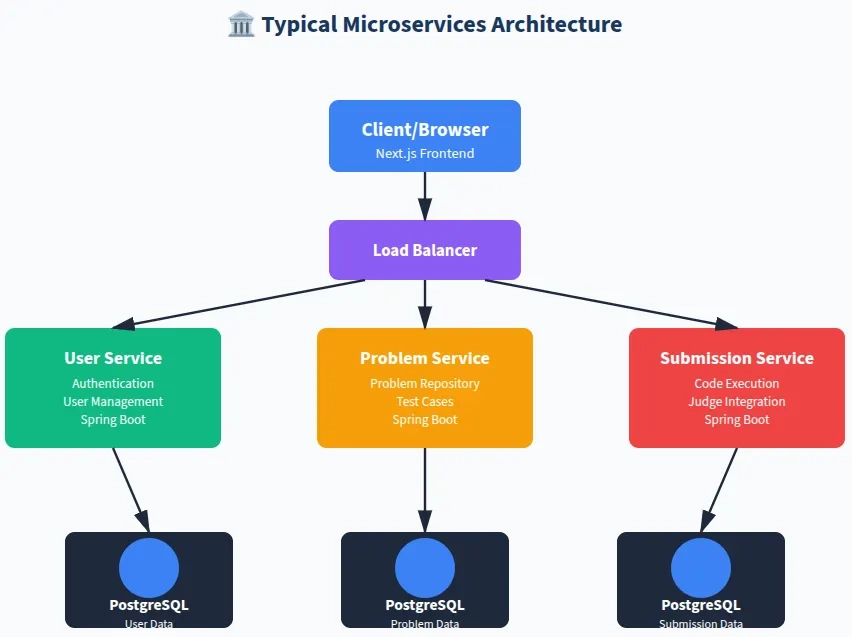
The first step in server selection is thoroughly understanding your application’s architecture. Modern applications often follow microservices patterns, where different services handle specific functionalities. Each microservice may have unique resource requirements based on its responsibilities. For instance, a user authentication service might be CPU-intensive due to encryption operations, while a file storage service would be storage-heavy but light on CPU usage.
Documenting your architecture helps identify dependencies and potential bottlenecks. Consider how services communicate – synchronous HTTP calls, message queues, or event streams. Each communication pattern has different network and latency requirements. Understanding these patterns helps in choosing appropriate network capabilities and determining whether services should be colocated or distributed across multiple servers.
Step 2: Calculate Resource Requirements
Resource calculation transforms abstract architecture into concrete numbers. This process involves analyzing multiple metrics simultaneously to arrive at realistic resource estimates. The methodology requires understanding both per-request resource consumption and cumulative load over time. While precise calculations are impossible without real-world data, educated estimates based on similar applications and technology stacks provide a solid starting point.
Memory Calculation Framework
Memory Requirements Calculation
1. Base Application Memory:
Each Spring Boot application typically requires 512MB – 1GB base memory for the JVM, application code, and frameworks. For our three microservices:
3 services × 750MB average = 2.25 GB
2. Concurrent Request Memory:
With 2000 requests/day (~0.023 requests/second average), peak traffic might reach 2-5 concurrent requests. Each request typically consumes 10-50MB depending on complexity:
5 concurrent × 30MB average = 150 MB
3. Database Connection Pool:
PostgreSQL connection pools typically consume 5-10MB per connection. With 3 databases and ~10 connections each:
30 connections × 8MB = 240 MB
4. Operating System & Overhead:
Linux OS, Docker containers, and system processes require memory:
OS + Docker + Buffer = 1 GB
5. Growth Buffer (30%):
Always include headroom for traffic spikes and unexpected growth:
Total × 1.3 = Safety margin
Total Memory Required: (2.25 + 0.15 + 0.24 + 1) × 1.3 ≈ 4.8 GB
Recommend 6-8 GB RAM
CPU Calculation Framework
CPU Requirements Calculation
1. Average Request Processing Time:
Spring Boot REST APIs typically process requests in 50-200ms. Assuming 100ms average per request:
2000 requests/day = 0.023 requests/second average
2. Peak Traffic Multiplier:
Peak hours might see 10-20x average traffic. Using conservative 15x multiplier:
0.023 × 15 = ~0.35 requests/second at peak
3. CPU Time Calculation:
Each request consuming 100ms CPU time at peak load:
0.35 requests/sec × 0.1 sec = 3.5% CPU utilization at peak
4. Database & Background Tasks:
PostgreSQL queries, indexing, scheduled jobs add ~20% baseline CPU usage:
20% baseline + 3.5% traffic = 23.5% total
5. Safety Margin:
Keep CPU utilization under 70% for system stability:
23.5% current + 46.5% headroom = Comfortable margin
CPU Cores Required: 2-4 vCPU cores are sufficient with excellent headroom
Recommend 4 vCPU
Storage Calculation Framework
Storage Requirements Calculation
- Application & Dependencies:
Spring Boot JARs, JDK, Next.js build, node_modules:
Applications = ~3 GB
- Database Storage:
Initial database schema and expected data growth over 6 months:
- User database: 100K users × 2KB = 200 MB
- Problem database: 1000 problems × 50KB = 50 MB
- Submission database: 100K submissions × 5KB = 500 MB
Total databases = ~750 MB → 1 GB with indexes
- Logs & Backups:
Application logs, error logs, database backups:
Logs + Backups = 10-15 GB
- Operating System:
Ubuntu, Docker images, system files:
OS + Docker = ~10 GB
Total Storage Required: 3 + 1 + 15 + 10 = 29 GB
Recommend 50-100 GB SSD Storage
Step 3: Consider Scalability & Future Growth
Planning for scalability from the outset prevents costly migrations and downtime in the future. Scalability comes in two forms: vertical scaling (upgrading existing servers with more resources) and horizontal scaling (adding more servers). Your architecture should support your preferred scaling strategy. Microservices architectures naturally support horizontal scaling, allowing you to add more instances of specific services that become bottlenecks.
When evaluating scalability, consider both planned growth and unexpected spikes. If you anticipate user growth, your server provider should offer easy resource upgrades without downtime. If your application might experience viral growth or seasonal traffic patterns, ensure your infrastructure can quickly scale horizontally. Some providers offer auto-scaling capabilities that automatically adjust resources based on load, which can be invaluable for applications with unpredictable traffic patterns.
Common Scalability Pitfalls
- Database bottlenecks: Scaling application servers is easy, but databases require careful planning for read replicas, connection pooling, and query optimization.
- Session management: Stateful applications storing sessions locally can’t easily scale horizontally. Use Redis or similar distributed caching.
- File storage: Local file systems don’t scale well. Plan for object storage (S3-compatible) for user uploads and media files.
- Configuration management: Ensure your configuration system supports multiple instances with consistent settings across all nodes.
Real-World Case Study: BanglyCode Platform
Project Overview
BanglyCode is a programming education platform built with a modern microservices architecture. The platform serves Bengali-speaking developers with coding tutorials, practice problems, and an online judge system for code evaluation.
Architecture Breakdown
Frontend: Next.js application for server-side rendering and optimal SEO
Backend Microservices:
- User Service: Handles authentication, authorization, user profiles, and session management
- Problem Service: Manages coding problems, test cases, editorial content, and problem categories
- Submission Service: Processes code submissions, integrates with Judge0, manages execution results, and maintains submission history
Database: Three separate PostgreSQL databases (one per service) for data isolation and independent scaling
Expected Load: 2000 requests per day with growth expectations
Detailed Resource Analysis
1. Memory Requirements
The BanglyCode platform’s memory requirements stem from multiple sources. Each Spring Boot microservice runs in its own JVM, requiring base memory allocation. The Next.js frontend, running on Node.js, adds additional memory overhead. PostgreSQL databases maintain connection pools and query caches in memory. During request processing, temporary objects are created in heap memory, and concurrent requests accumulate memory usage.
Calculated Memory Needs:

- Spring Boot Services (3): 750MB × 3 = 2.25 GB
- Next.js Frontend: 512 MB
- PostgreSQL Databases (3): 400MB × 3 = 1.2 GB (includes connection pools and caches)
- Request Processing Buffer: 300 MB
- Operating System + Docker: 1 GB
- Growth Buffer (30%): 1.6 GB

Total: ~6.9 GB → Recommended: 8 GB RAM
2. CPU Requirements
With 2000 requests per day, the average load is minimal (~0.023 requests/second). However, traffic patterns are rarely uniform. Peak hours might see 15-20x average traffic. Additionally, background tasks like database maintenance, log processing, and scheduled jobs consume CPU cycles. The submission service, which integrates with the judge machine for code execution, might experience periodic CPU spikes during compilation and execution phases, though the heavy lifting is typically offloaded to judge containers.
CPU Calculation:

- Average load: 0.023 requests/second
- Peak load (15x): ~0.35 requests/second
- CPU utilization at peak: ~25% with 2 cores

Recommended: 2-4 vCPU cores for comfortable headroom
3. Storage Requirements
Storage planning must account for immediate needs and anticipated growth. Application artifacts (JAR files, Node modules) are relatively static. Database growth depends on user acquisition and activity levels. Logs accumulate over time and require rotation policies. Regular database backups ensure data safety but consume additional space. For optimal database performance, SSD storage is strongly recommended over traditional HDDs.
Storage Breakdown:

- Applications + Dependencies: 5 GB
- Databases (current + 6 months growth): 5 GB
- Logs + Monitoring: 10 GB
- Database Backups: 15 GB
- System + Docker Images: 15 GB

Total: ~50 GB → Recommended: 100 GB SSD
4. Network & Bandwidth
Network requirements are relatively modest for 2000 requests/day. Assuming average response size of 50KB and request size of 5KB, daily bandwidth usage is approximately 110 MB. However, peaks during high-traffic periods and media content delivery (if applicable) require adequate bandwidth headroom. Most modern VPS providers offer 1-10 TB monthly bandwidth, which is more than sufficient for this traffic level.
Server Recommendations & Options
Option 1: Single Server Deployment (Recommended for Start)
For applications at the BanglyCode scale (2000 requests/day), a single well-provisioned server is the most cost-effective and manageable solution. This approach simplifies deployment, reduces operational overhead, and minimizes costs while providing ample room for growth. As traffic increases, you can vertically scale (upgrade resources) or migrate to a multi-server architecture.
Ideal Server Specification
Component | Component | Justification |
|---|---|---|
CPU |
4 vCPU cores |
Comfortable headroom for peak traffic and background tasks |
RAM |
8 GB |
Supports all services with 30% growth buffer |
Storage |
100 GB SSD |
Fast database access, ample space for growth |
Bandwidth |
1-2 TB/month |
More than sufficient for 2000 req/day |
Network |
1 Gbps |
Fast response times and API calls |
Option 2: Future Multi-Server Architecture
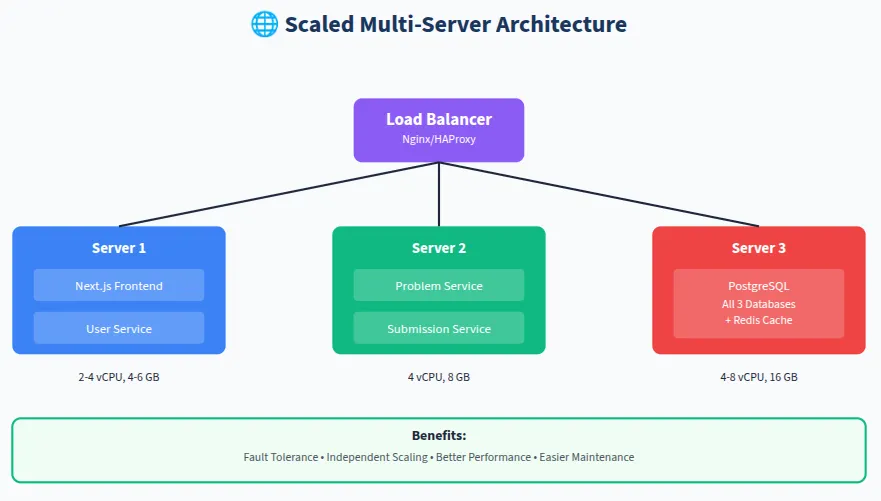
As your application scales beyond 10,000-20,000 requests per day, consider distributing services across multiple servers. This architecture provides better fault tolerance, allows independent scaling of services, and improves performance by dedicating resources to specific workloads.
Additional Considerations
1. Monitoring & Observability
Server selection is only the beginning. Implementing comprehensive monitoring ensures you can validate your resource estimates and make data-driven decisions about scaling. Tools like Prometheus, Grafana, and application performance monitoring (APM) solutions provide visibility into CPU usage, memory consumption, disk I/O, and network throughput. Set up alerts for resource utilization thresholds (e.g., CPU >70%, RAM >80%) to proactively address potential issues.2. Database Optimization
Database performance often becomes the bottleneck before application servers. Proper indexing, query optimization, and connection pool tuning can dramatically reduce resource requirements. Consider implementing database read replicas for read-heavy workloads, which can reduce load on the primary database. PostgreSQL’s connection pooling (PgBouncer) can significantly reduce memory consumption while improving throughput.3. Caching Strategy
Implementing Redis or Memcached for caching frequently accessed data reduces database load and improves response times. Cache user sessions, frequently queried problem lists, and computed results. A well-implemented caching layer can reduce database queries by 60-80%, allowing your existing servers to handle significantly more traffic.4. Backup & Disaster Recovery
Plan for backups from day one. Automated daily database backups, application snapshots, and off-site storage ensure business continuity. Consider implementing a backup strategy that balances retention periods with storage costs. Most providers offer snapshot features that can create point-in-time backups of your entire server, enabling quick recovery from catastrophic failures.5. Security Hardening
Security considerations affect server selection. Ensure your provider offers DDoS protection, firewalls, and security groups. Implement fail2ban, configure UFW or iptables, keep systems updated, and follow security best practices. Security breaches can cause unexpected resource consumption, making proper security essential for predictable performance.When to Scale Up or Out
Signs You Need to Scale:- CPU consistently >70%: System instability and slow response times indicate insufficient processing power
- Memory usage >85%: Risk of out-of-memory errors and application crashes
- Disk I/O wait >20%: Database queries slowing down, consider faster storage or read replicas
- Response times degrading: Users experiencing slowness even during normal traffic periods
- Frequent downtime: Server becoming unstable or unavailable under normal load
- Traffic growth >50% over 2 months: Proactive scaling prevents emergency firefighting
- Vertical Scaling (Scale Up): Upgrade your existing server with more CPU, RAM, or storage. This is simpler but has limits and may require downtime.
- Horizontal Scaling (Scale Out): Add more servers and distribute load. More complex but provides better fault tolerance and theoretically unlimited scaling.
- Hybrid Approach: Start with vertical scaling for simplicity, then move to horizontal scaling as complexity justifies the operational overhead.
Final Recommendations for BanglyCode
Current Stage (2000 requests/day)

Single Server Approach:

- Provider: Contabo VPS M or Hetzner CPX31
- Specs: 4-6 vCPU, 8-16 GB RAM, 100-200 GB SSD
- Benefits: Cost-effective, simple management, room for 10x growth

Growth Stage (10,000+ requests/day)

Multi-Server Approach:

- Separate frontend, application, and database servers
- Implement load balancing
- Add Redis caching layer
- Consider managed database services (AWS RDS, Digital Ocean Managed PostgreSQL)

Enterprise Stage (100,000+ requests/day)

Cloud-Native Architecture:

- Kubernetes cluster for orchestration
- Auto-scaling based on metrics
- CDN for static assets (Cloudflare, AWS CloudFront)
- Managed services for databases, caching, and storage
- Multi-region deployment for global users
Key Takeaways
Essential Principles:
- Start conservative, scale proactively: Begin with adequate but not excessive resources. Monitor and scale before problems occur.
- Understand your architecture: Different architectures have different resource patterns. Know your application’s characteristics.
- Calculate based on data: Use metrics, not guesswork. Request rates, concurrent users, and data sizes drive decisions.
- Plan for growth: Choose infrastructure that can scale with your success without requiring painful migrations.
- Monitor everything: You can’t optimize what you don’t measure. Implement comprehensive monitoring from day one.
- Balance cost and performance: The cheapest option isn’t always the most cost-effective. Consider management time and stability.
- Test under load: Stress test your infrastructure before launch to validate calculations and identify bottlenecks.
We use cookies to ensure that we give you the best experience on our website. If you continue to use this site we will assume that you are happy with it.AcceptPrivacy policy